
Audit Trail
The Audit Trail provides a chronological record of all significant activities within a workspace. It captures both user-initiated actions and system-generated events, providing complete visibility into operational and administrative activity.
Entries may include dashboard access, widget management, user administration, Action execution, report generation, scheduled processes, and other events recorded by StatStream.
The Audit Trail enables administrators to monitor user activity, verify automated operations, investigate issues, and maintain an auditable history of workspace events.
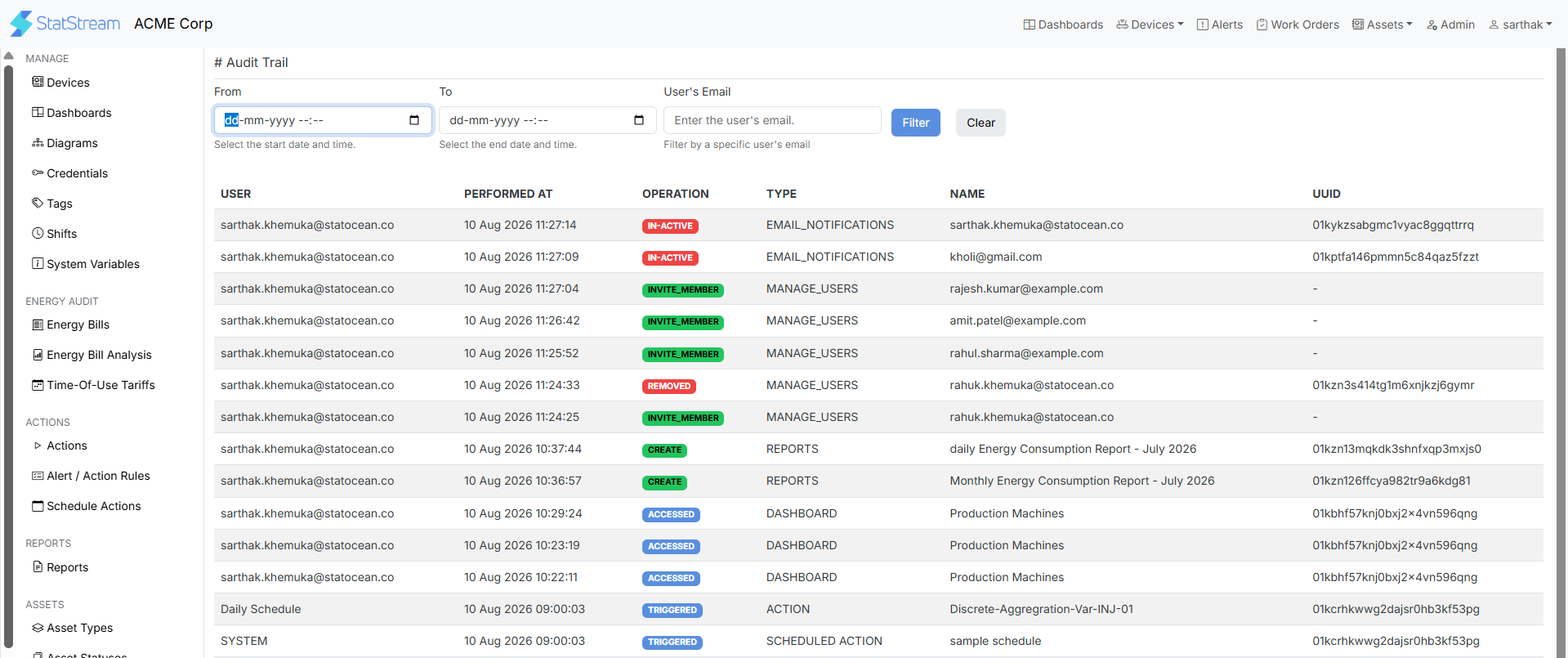
Access the Audit Trail
Section titled “Access the Audit Trail”To view the Audit Trail:
- Go to Admin in the top bar.
- Select Audit Trail in the left sidebar.
Filter the Audit Trail
Section titled “Filter the Audit Trail”Use the available filters to narrow the displayed records.
| Field | Description |
|---|---|
| From | Displays entries created on or after the selected date and time. |
| To | Displays entries created on or before the selected date and time. |
| User’s Email | Displays activities performed by a specific user. |
The Audit Trail log
Section titled “The Audit Trail log”Each record contains the following information.
| Column | Description |
|---|---|
| User | The user or system component that generated the event (for example, a user’s email address, SYSTEM, or SCHEDULER). |
| Performed At | The date and time when the event occurred. |
| Operation | Specifies the operation performed, including actions such as ACCESSED, ADDED, UPDATED, DELETED, TRIGGERED, and FAILED. |
| Type | Specifies the type of resource associated with the event, including DASHBOARD, WIDGET, ACTION, REPORTS, MANAGE_USERS, and other supported resource types. |
| Name | The name of the resource associated with the event. |
| UUID | The unique identifier of the resource associated with the event. |
Sample Audit Entries
Section titled “Sample Audit Entries”Examples of activities recorded in the Audit Trail include:
- Opening a dashboard (ACCESSED → DASHBOARD)
- Adding a widget (ADDED → WIDGET)
- Inviting a user (INVITE_MEMBER → MANAGE_USERS)
- Executing a scheduled Action (TRIGGERED → ACTION)
- Generating a scheduled report (TRIGGERED → REPORTS)
Note
Repeated FAILED events for the same resource may indicate an underlying configuration or data issue. Reviewing these entries can help identify and resolve recurring operational problems.