
Time-of-Use Tariffs
Time-of-Use (TOU) tariffs are electricity pricing schedules where the cost of electricity varies based on the time of day, day of the week, or season. Utility providers commonly use TOU tariffs to encourage energy usage during off-peak hours and better manage electricity demand.
StatStream allows you to configure TOU tariff schedules by defining seasons and tariff slots with their respective unit prices. Once configured, the platform automatically applies the appropriate tariff based on the configured season, day, and time to calculate electricity costs. These calculated values are then used throughout the platform for energy bill analysis, reporting, dashboards, and analytics.
Accessing Time-of-Use Tariffs
Section titled “Accessing Time-of-Use Tariffs”To configure TOU tariffs:
- Click Admin from the top navigation bar.
- Select Time-of-Use Tariffs from the left sidebar.
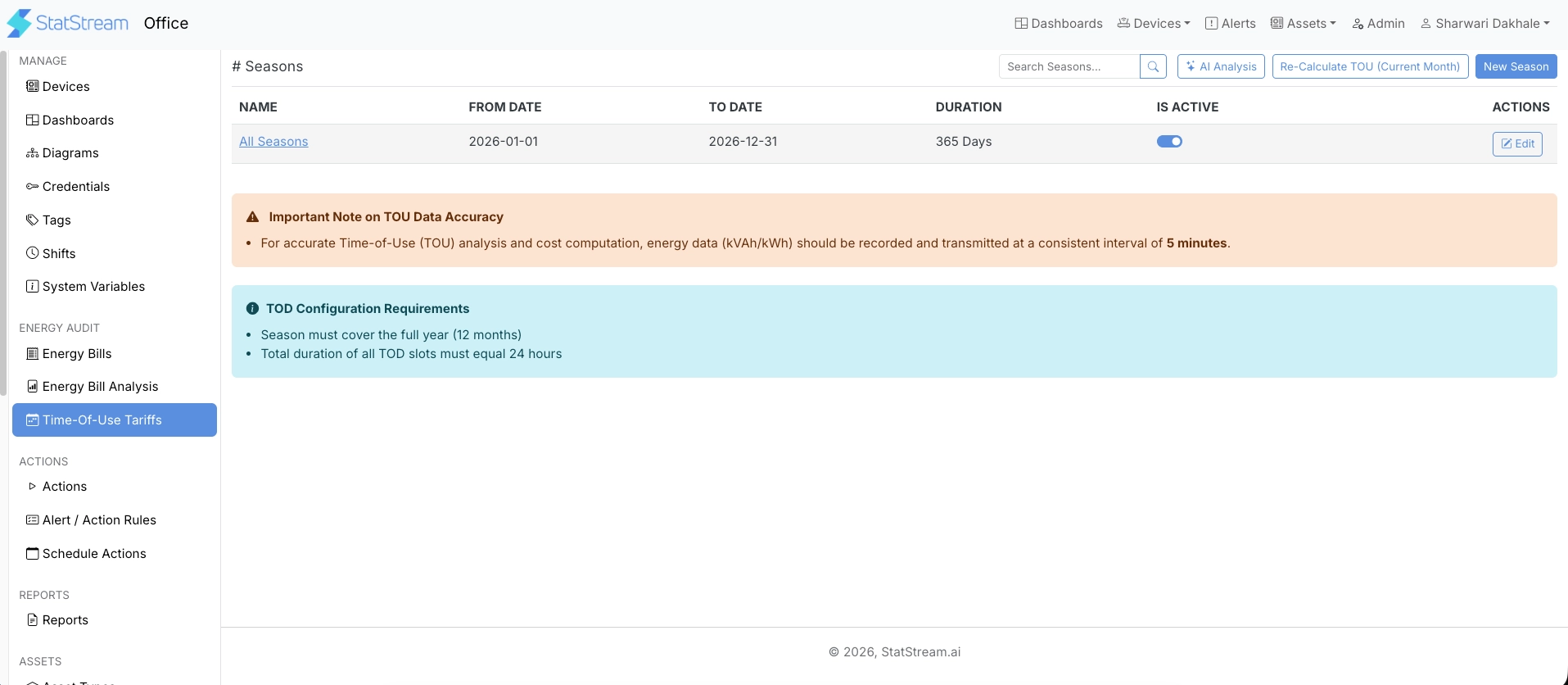
The Time-of-Use Tariffs page displays all configured seasons.
Creating a Season
Section titled “Creating a Season”A season defines the date range during which a set of tariff slots remains active.
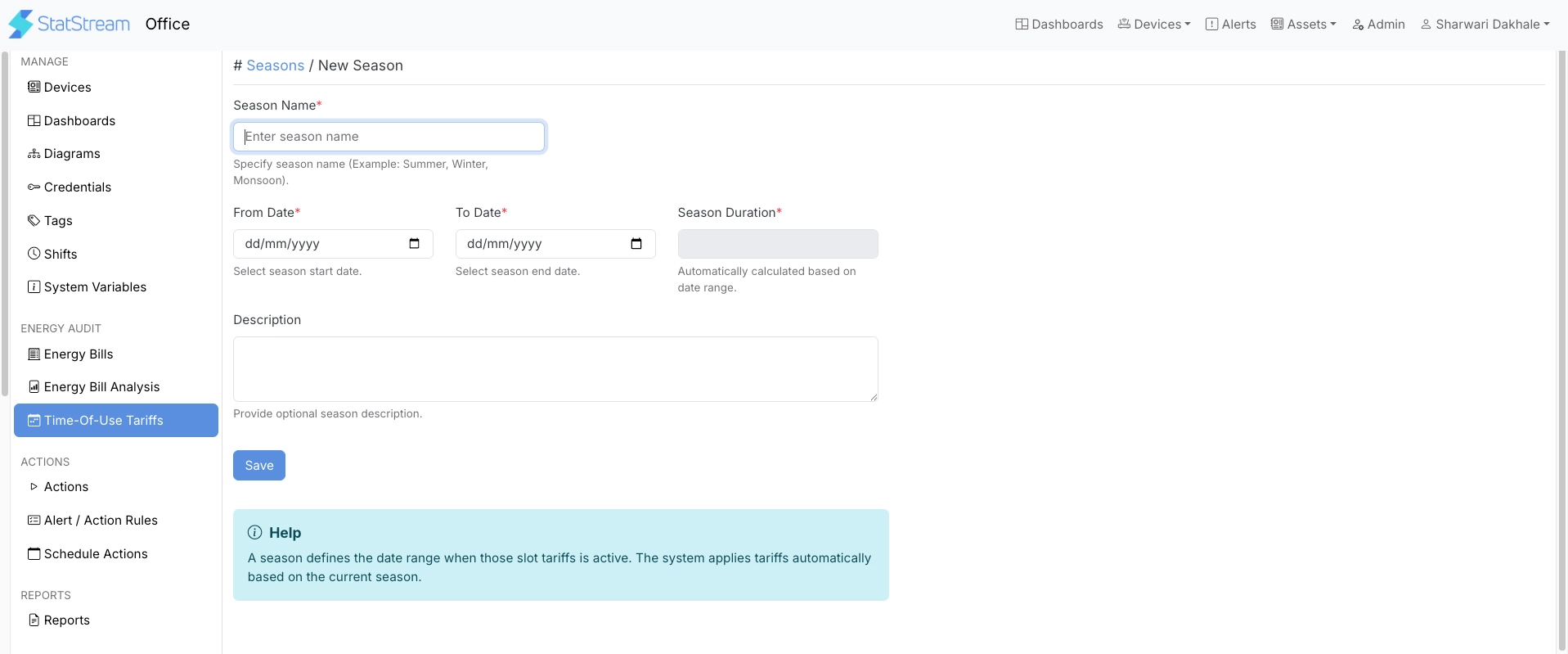
Click New Season and provide the following information:
| Field | Description |
|---|---|
| Season Name | A unique name used to identify the season. |
| From Date | Date on which the season becomes active. |
| To Date | Date on which the season ends. |
| Season Duration | Automatically calculated from the selected date range. |
| Description | Optional description of the season. |
After creating a season, configure one or more tariff slots within it.
Creating Tariff Slots
Section titled “Creating Tariff Slots”A tariff slot defines the electricity rate for a specific time period within a season.
Open the required season and click New Slot.
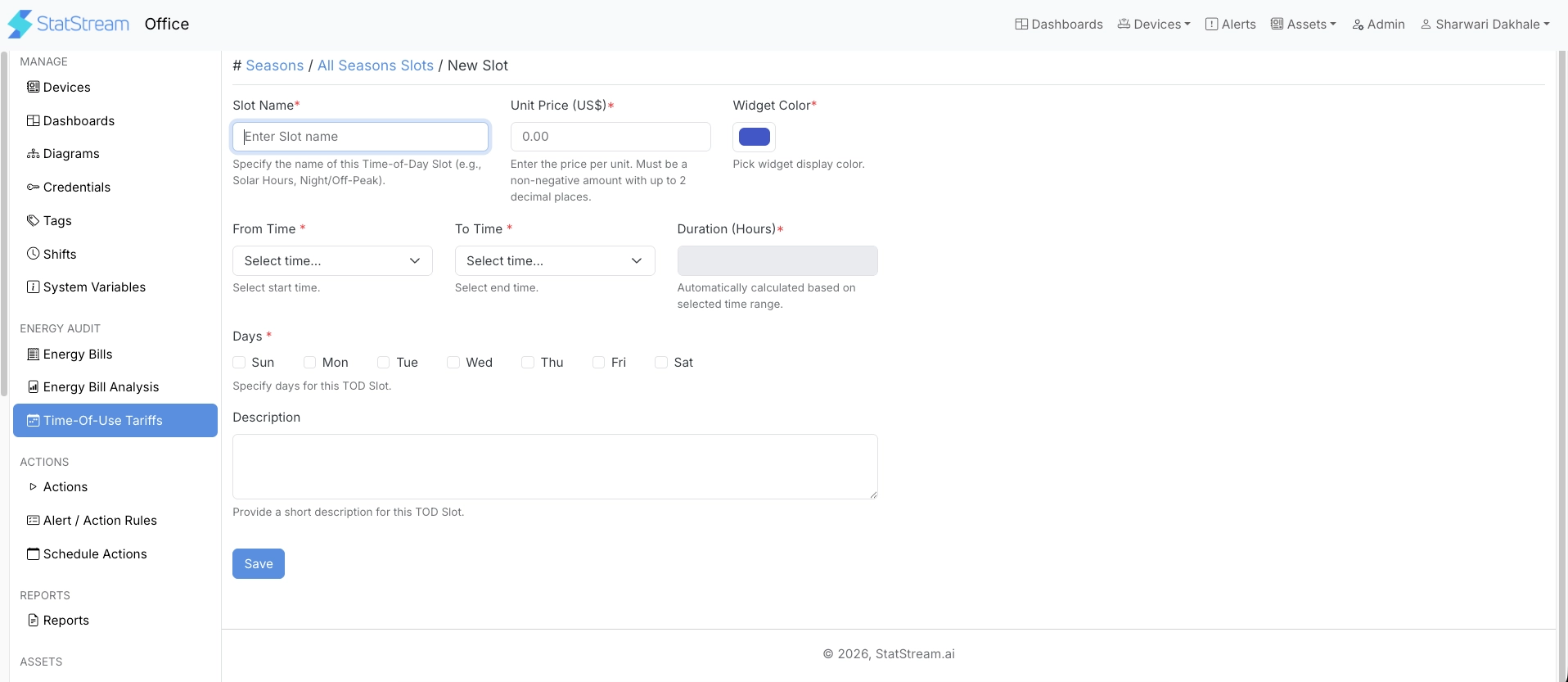
Provide the following information:
| Field | Description |
|---|---|
| Slot Name | Name used to identify the tariff slot. |
| Unit Price | Electricity price charged during the selected time period. |
| Widget Color | Color used to represent the slot in dashboards and visualizations. |
| From Time | Slot start time. |
| To Time | Slot end time. |
| Duration | Automatically calculated from the selected time range. |
| Days | Days of the week on which the tariff applies. |
| Description | Optional description of the tariff slot. |
TOU Configuration Guidelines
Section titled “TOU Configuration Guidelines”For accurate tariff calculations, ensure that:
- Seasons collectively cover the entire year without any gaps.
- The combined duration of all tariff slots equals 24 hours for each day.
- Tariff slots within the same season do not overlap.
- The appropriate days of the week are assigned to each tariff slot.
- Only active seasons and tariff slots are considered during cost calculation.
Recalculating TOU
Section titled “Recalculating TOU”If you update TOU seasons, tariff slots, or unit prices after energy data has already been processed, previously calculated TOU costs are not updated automatically.
Click Re-Calculate TOU (Current Month) to recalculate TOU consumption and cost for the current month’s data using the latest TOU configuration.
Automatic Cost Calculation
Section titled “Automatic Cost Calculation”Once TOU tariffs are configured, StatStream automatically determines the applicable tariff by matching the configured:
- Season
- Day of the week
- Time slot
Using the corresponding unit price, the platform calculates electricity costs from recorded energy consumption. The calculated values are then available throughout StatStream for:
- Energy Bill Analysis
- Dashboards
- Reports
- Asset-level Analytics
- Cost and Consumption Analysis
Important Notes
Section titled “Important Notes”- TOU calculations are performed only for configured electricity consumption variables.
- If the required energy readings are unavailable, the corresponding cost calculation is skipped.
- Any updates to seasons or tariff slots are applied to future calculations based on the updated configuration.