
Energy Bill Analysis
Energy Bill Analysis provides AI-generated energy audit reports based on your uploaded electricity bills. These reports analyze historical consumption patterns and provide recommendations to improve energy efficiency, reduce costs, and optimize energy usage.
Accessing Energy Bill Analysis
Section titled “Accessing Energy Bill Analysis”- Click Admin in the top navigation bar.
- Under Energy Audit, select Energy Bill Analysis.
Generating a Report
Section titled “Generating a Report”Energy audit reports are generated from the Energy Bills section.
When you click Generate Report, StatStream:
- Analyzes the last six months of uploaded energy bills.
- Processes the report in the background.
- Makes the generated report available in the Energy Bill Analysis page once processing is complete.
Viewing the Analysis Report
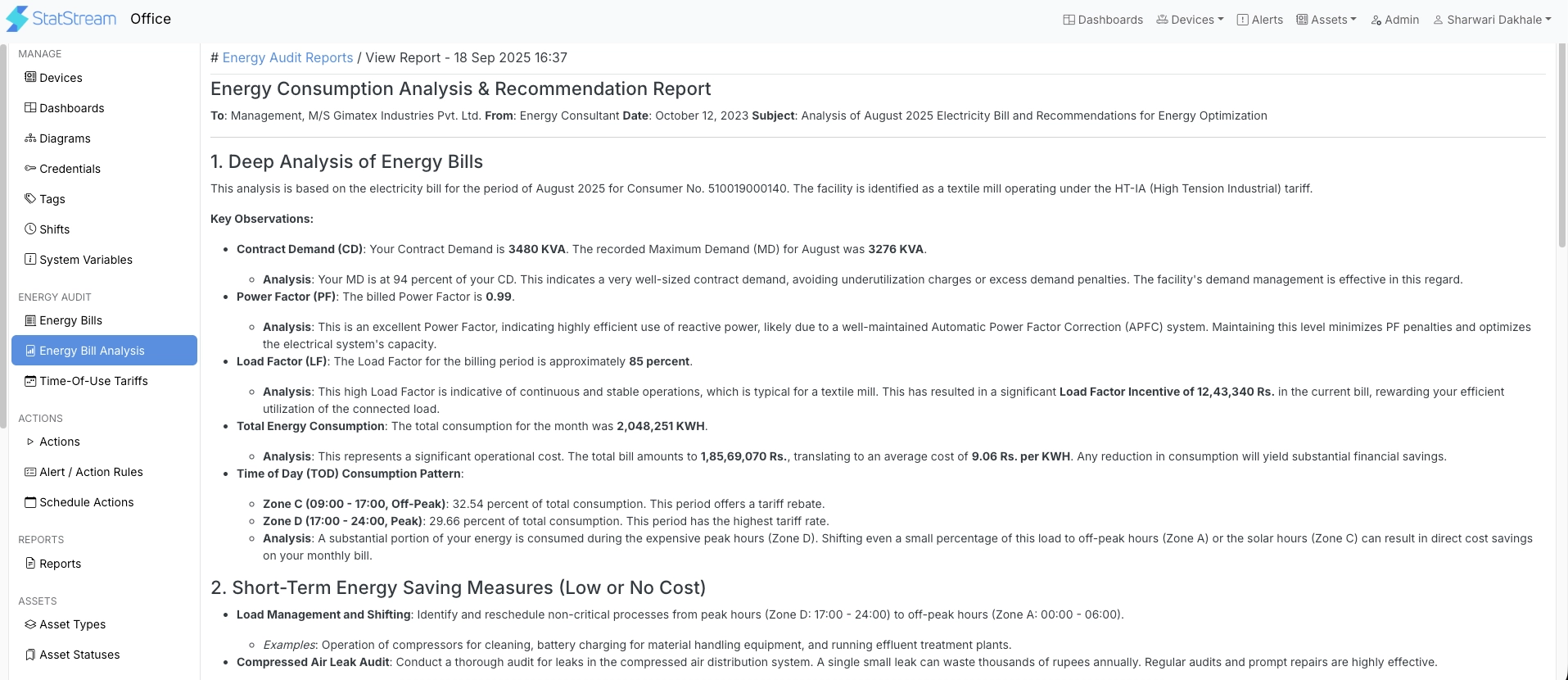
Section titled “Viewing the Analysis Report”The Energy Bill Analysis page displays the most recently generated energy audit report based on your uploaded energy bills.
To open the report, click View Analysis Report.
Report Overview
Section titled “Report Overview”The generated report provides AI-powered insights based on your uploaded energy bills. Depending on the available billing data, the report may include:
- Analysis of historical energy consumption and billing trends.
- Identification of inefficiencies and opportunities for improvement.
- Recommendations to reduce energy consumption and operating costs.
- Energy-saving measures based on your usage patterns.
- Sustainability insights, such as estimated carbon emissions.
- Industry-specific recommendations and best practices.
- Additional AI-generated observations and recommendations relevant to your facility.
The content and structure of the report may vary depending on the uploaded data and future enhancements to the analysis engine.