
Sites
The Sites feature allows you to create and manage physical locations within StatStream. Once configured, your sites can be displayed on an interactive map, providing a centralized view of geographically distributed assets and their real-time status.
Typical use cases include:
- Solar power plants
- Transformer installations
- Overhead water tanks
- Industrial facilities
- Remote monitoring locations
- Any asset with a fixed geographic location
You can also configure a primary variable for each site, allowing its latest real-time value to be displayed directly on the map for quick monitoring.
Create a Site
Section titled “Create a Site”Follow these steps to add a new site:
- Navigate to Admin from the top navigation bar.
- Select Sites from the left sidebar.
- Click New Site in the upper-right corner.
Site Configuration
Section titled “Site Configuration”When creating a site, provide the following information:
| Field | Description |
|---|---|
| Site Name | A unique name for the site. |
| Address | Physical address of the location. |
| City | City where the site is located. |
| State | State or province. |
| Country | Country of the site. |
| Latitude & Longitude | Geographic coordinates used for map placement. |
| Display Variable | The real-time parameter shown on the map widget. |
After entering the required information, click Save to create the site.
Site Creation
Section titled “Site Creation”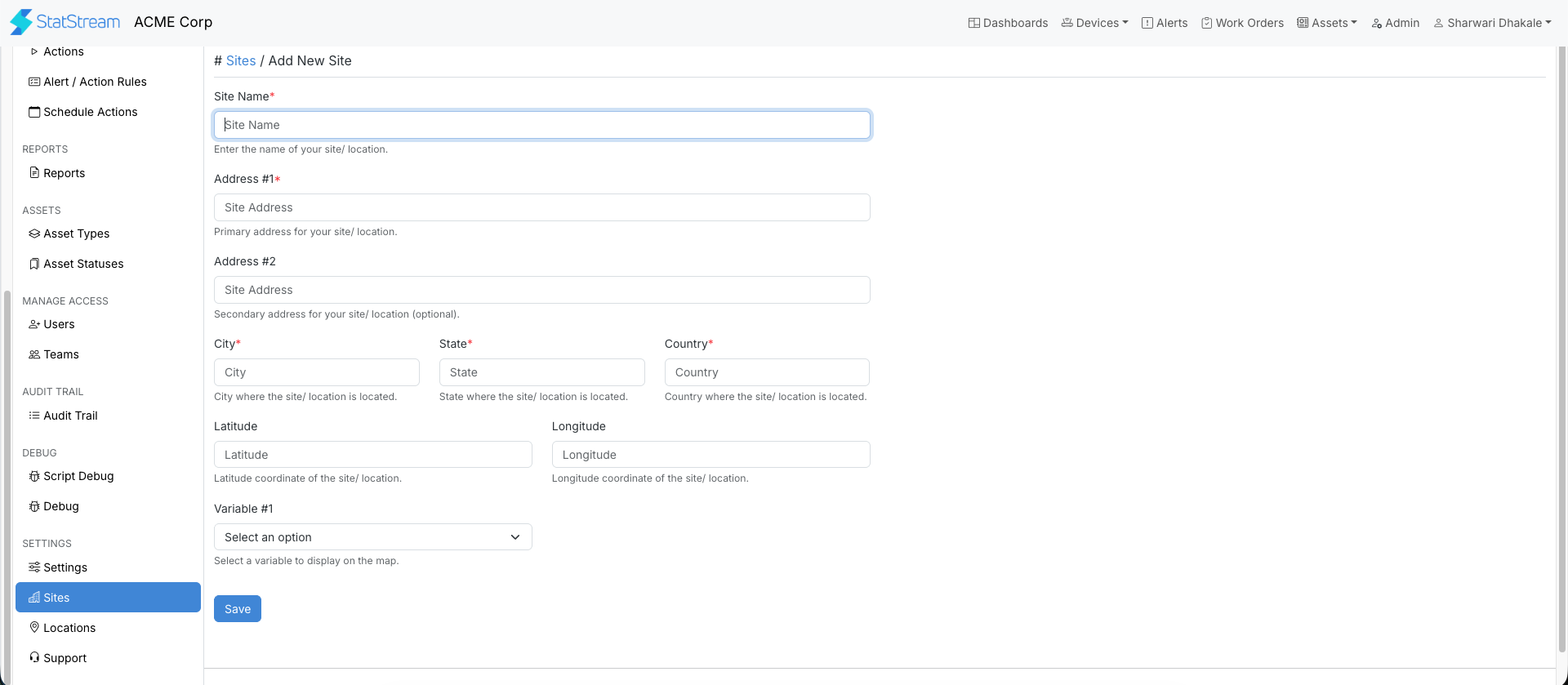
Site Management
Section titled “Site Management”After a site is created, it becomes available for use in dashboards and map-based visualizations. Properly configured locations help operators quickly identify asset locations and monitor key operational data in real time.