
Daily Report
Configure a daily email report for your selected variable data.
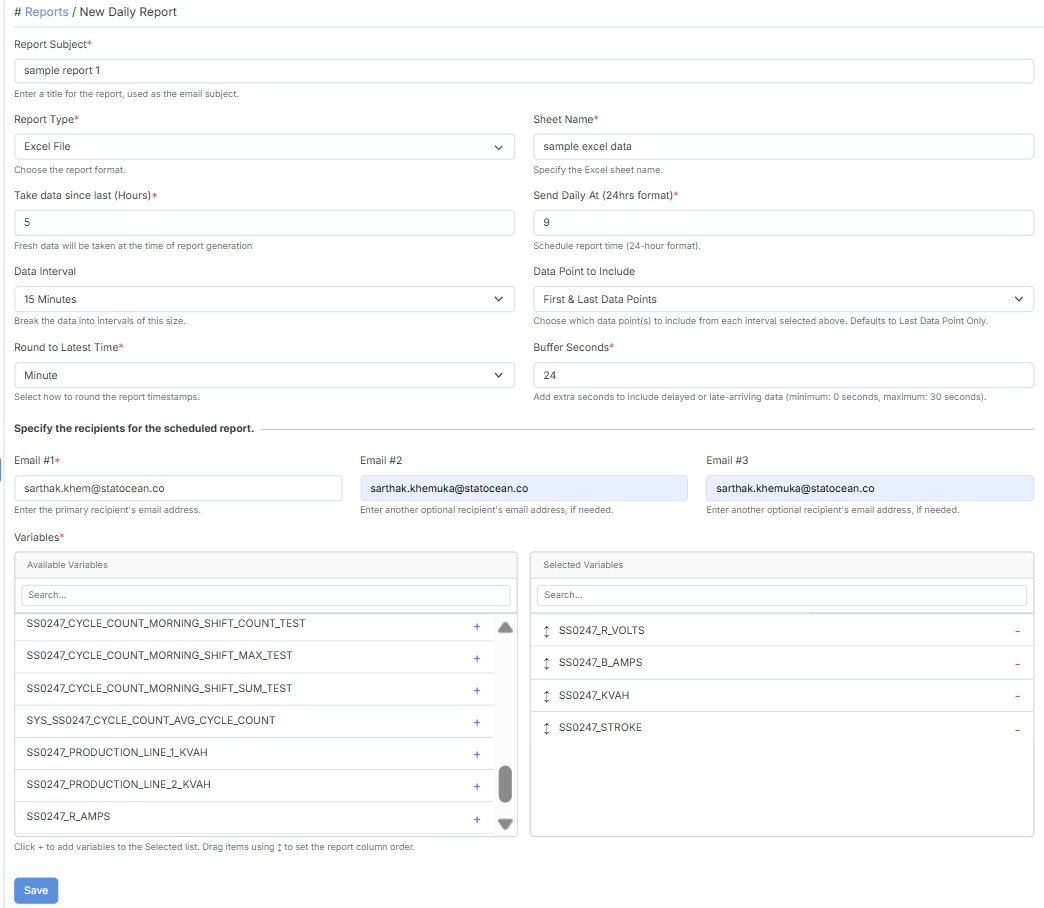
Configuration
Section titled “Configuration”| Field | Description |
|---|---|
| Report Subject | A title for the report, used as the email subject. |
| Report Type | The report format (e.g. Excel File). |
| Sheet Name | The Excel sheet name. |
| Take data since last (Hours) | How many past hours of data to include. Fresh data is taken at the time of report generation. |
| Send Daily At (24hrs format) | The time the report is generated and sent each day. |
| Data Interval | Break the data into intervals of this size. |
| Data Point to Include | Which data point(s) to include from each interval selected above. Defaults to Last Data Point Only. |
| Round to Latest Time | Disable = use real/original timestamps. Second or Minute = round timestamps to that level. |
| Buffer Seconds | Extra seconds to include delayed or late-arriving data (minimum 0, maximum 30 seconds). |
| Email #1 | The primary recipient’s email address. Required. |
| Email #2 / Email #3 | Optional additional recipients. |
| Variables | The variables to include in the report. |