
Debug
Debug provides a real-time view of the payloads received from connected devices. It helps verify that devices are transmitting data correctly, inspect incoming payloads, and troubleshoot communication or data-processing issues during device integration and testing.
Viewing Live Payloads
Section titled “Viewing Live Payloads”Go to Admin → Debug.
Enable Toggle Debug to start capturing incoming device payloads. The Status indicator shows whether debug logging is currently On or Off.
While debugging is enabled, each received payload is displayed with the following information:
| Column | Description |
|---|---|
| Time | Date and time when the payload was received. |
| Protocol | Communication protocol used to send the payload (for example, HTTP or MQTT). |
| Destination | Device that received the payload. |
| Payload | Raw JSON payload received from the device. |
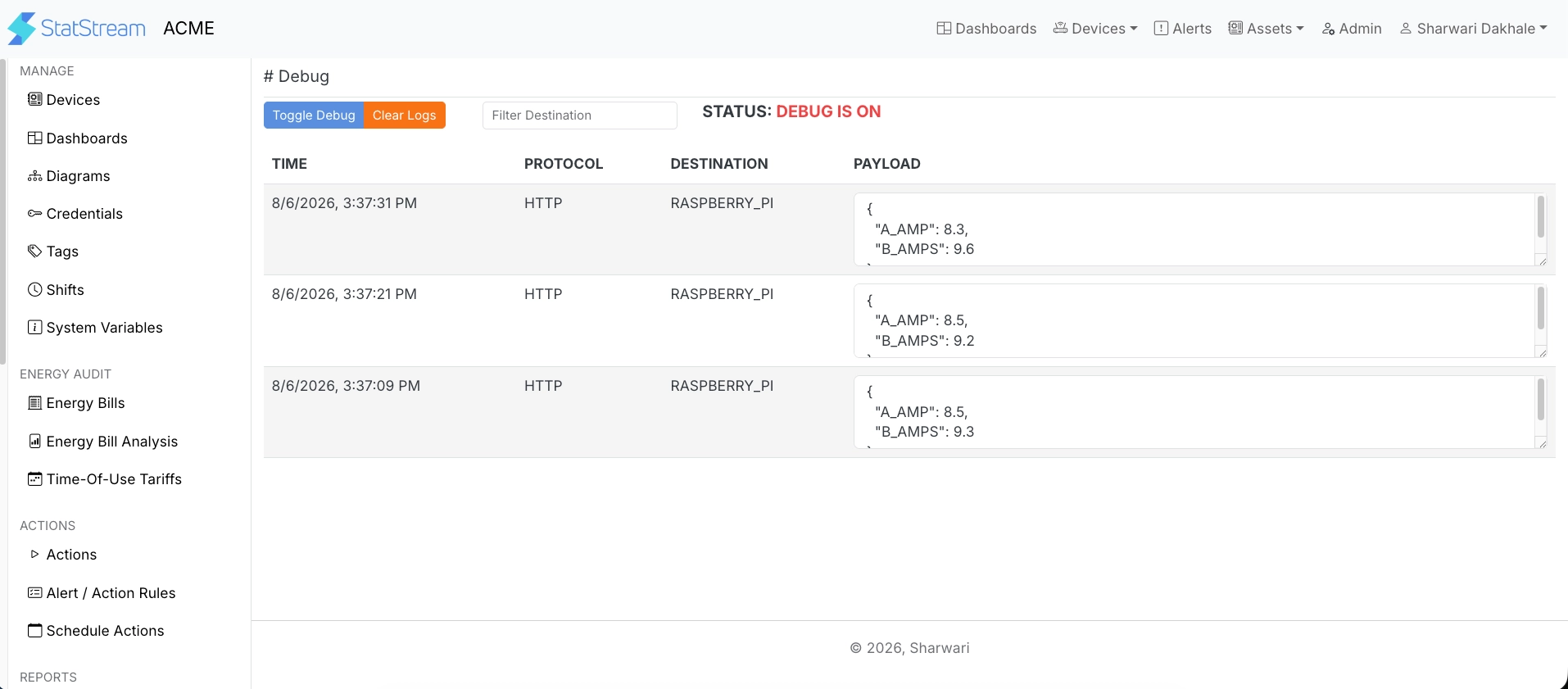
Use Filter Destination to display payloads for a specific device, or click Clear Logs to remove the current log entries.