
Notification Actions
Notification Actions allow StatStream to automatically send alerts, notifications, and operational updates through multiple communication channels. They ensure that the right users or teams are informed immediately whenever an Alert / Action Rule is triggered or a Schedule Action is executed.
Notification Actions help operators, maintenance teams, supervisors, and administrators stay informed without continuously monitoring the system.
Available Notification Actions
Section titled “Available Notification Actions”StatStream supports the following notification channels:
| Notification Action | Description |
|---|---|
| Send Email | Sends notifications to one or more email recipients. |
| Google Chat | Sends notifications to a configured Google Chat space. |
| Telegram StatStreamBot | Sends notifications using the StatStream Telegram Bot. |
| Slack | Sends notifications to a Slack workspace or channel. |
| StatStream WhatsApp Action | Sends notifications using predefined StatStream WhatsApp templates. |
| Mobile App Notification | Sends push notifications to the StatStream mobile application. |
Each notification action has its own configuration and is designed for a different communication platform.
Using Placeholders
Section titled “Using Placeholders”Most Notification Actions support placeholders, allowing live information to be inserted automatically into notification messages.
Instead of typing fixed text, you can use placeholders such as:
${rule}${severity}${severity-icon}${variable}${value}
When the notification is sent, StatStream automatically replaces each placeholder with the corresponding real-time value.
For example:
Alert: ${rule}Severity: ${severity}Current Value: ${value}might become:
Alert: Power Factor LowSeverity: CriticalCurrent Value: 0.32This allows a single notification template to work for every alert without requiring manual edits.
Send Email
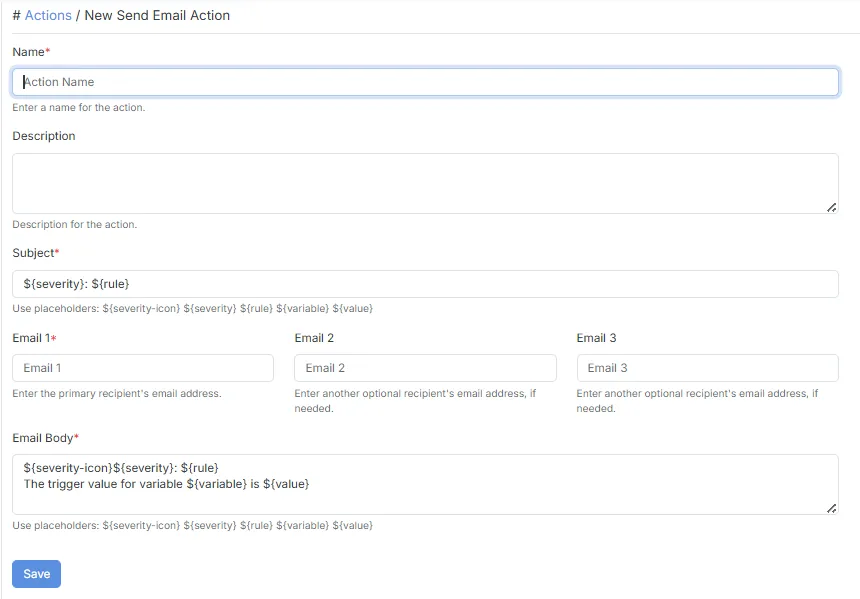
Section titled “Send Email”The Send Email action sends customizable email notifications to one or more recipients. It is commonly used for alert notifications, maintenance updates, scheduled reports, and operational communication.
Features
Section titled “Features”- Send notifications to up to three email recipients.
- Customize both the Subject and Email Body.
- Supports dynamic placeholders for live alert information.
- Can be triggered automatically by Alert / Action Rules or Schedule Actions.
- Ideal for detailed notifications that require rich message content
Configuration
Section titled “Configuration”| Field | Description |
|---|---|
| Name | Specifies the name of the email action. |
| Description | Provides a brief description of the action. |
| Subject | Defines the email subject. Supports dynamic placeholders. |
| Email 1 | Primary recipient email address. |
| Email 2 | Optional secondary recipient email address. |
| Email 3 | Optional additional recipient email address. |
| Email Body | Defines the email content. Supports dynamic placeholders. |
- Supports up to three recipients.
- Both the Subject and Email Body support placeholders.
- Suitable for maintenance alerts, reports, and operational notifications.
- Email content can be fully customized.
Google Chat
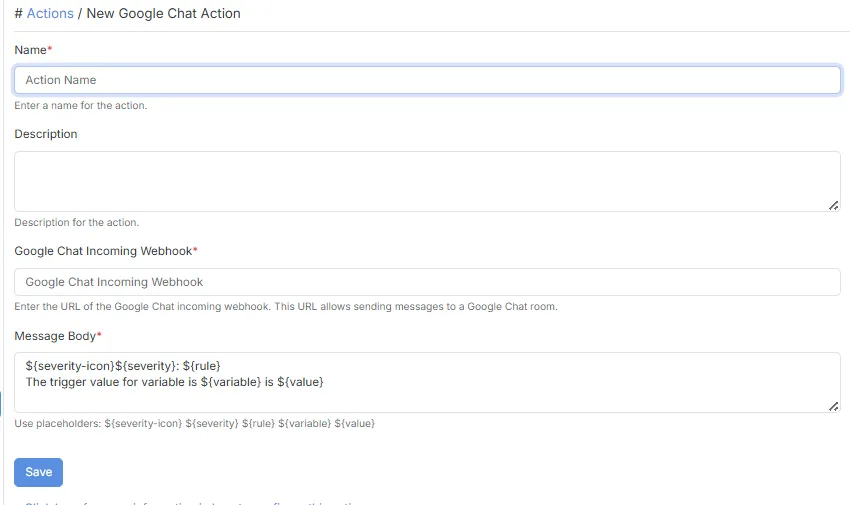
Section titled “Google Chat”The Google Chat action sends notifications directly to a Google Chat space using an Incoming Webhook. It enables teams to receive operational alerts and updates within their existing collaboration workspace.
Features
Section titled “Features”- Sends notifications directly to Google Chat.
- Uses a Google Chat Incoming Webhook.
- Supports dynamic placeholders.
- Automatically posts messages whenever the configured trigger occurs.
- Ideal for operations teams that collaborate through Google Chat.
Configuration
Section titled “Configuration”| Field | Description |
|---|---|
| Name | Specifies the action name. |
| Description | Provides a brief description. |
| Google Chat Incoming Webhook | Specifies the Incoming Webhook URL for the Google Chat space. |
| Message Body | Defines the notification message. Supports dynamic placeholders. |
- Requires a valid Google Chat Incoming Webhook.
- Supports dynamic placeholders.
- Messages are delivered instantly when the configured trigger occurs.
- Suitable for team collaboration and operational monitoring.
Telegram StatStreamBot
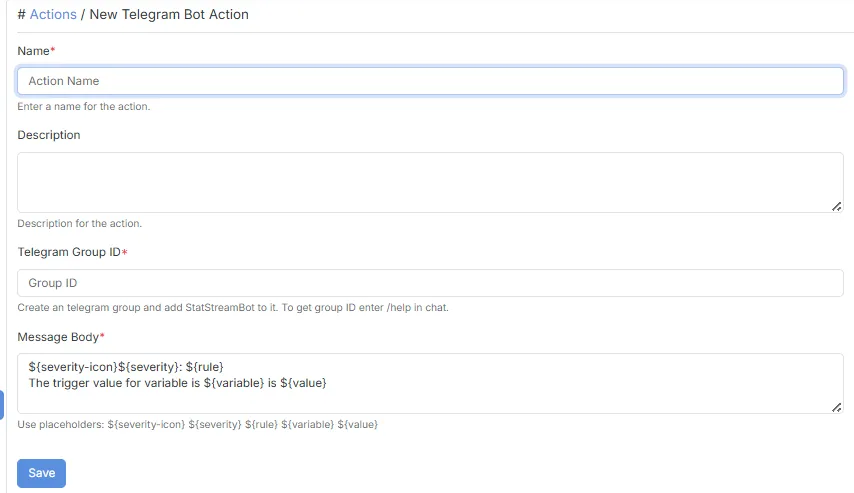
Section titled “Telegram StatStreamBot”The Telegram StatStreamBot action sends notifications to a Telegram group using the StatStream Telegram Bot. It enables operations and maintenance teams to receive instant alerts directly within Telegram whenever an alert or scheduled event occurs.
Features
Section titled “Features”- Sends notifications directly to Telegram groups.
- Uses the StatStream Telegram Bot for message delivery.
- Supports dynamic placeholders.
- Automatically delivers notifications whenever the configured trigger occurs.
- Ideal for operations, maintenance, and support teams using Telegram.
Configuration
Section titled “Configuration”| Field | Description |
|---|---|
| Name | Specifies the action name. |
| Description | Provides a brief description. |
| Telegram Group ID | Specifies the Telegram group where notifications will be sent. |
| Message Body | Defines the notification message. Supports dynamic placeholders. |
- The StatStreamBot must be added to the target Telegram group before notifications can be delivered.
- Requires a valid Telegram Group ID.
- Supports dynamic placeholders.
- Best suited for real-time operational alerts.
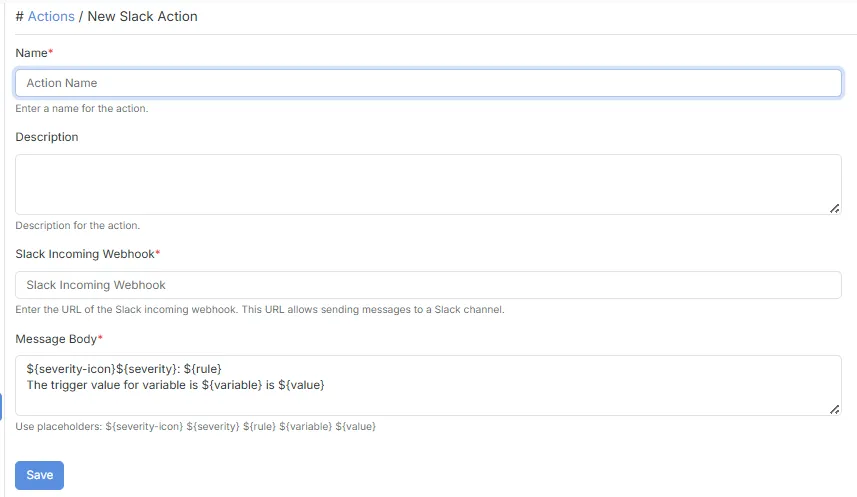
The Slack action sends notifications to a Slack workspace or channel using an Incoming Webhook. It enables engineering and operations teams to receive important updates directly within Slack.
Features
Section titled “Features”- Sends notifications directly to Slack.
- Uses Slack Incoming Webhooks.
- Supports dynamic placeholders.
- Automatically posts notifications whenever an alert or schedule is triggered.
- Integrates easily into existing Slack workflows.
Configuration
Section titled “Configuration”| Field | Description |
|---|---|
| Name | Specifies the action name. |
| Description | Provides a brief description. |
| Slack Incoming Webhook | Specifies the Incoming Webhook URL for the Slack workspace or channel. |
| Message Body | Defines the notification message. Supports dynamic placeholders. |
- Requires a valid Slack Incoming Webhook.
- Supports dynamic placeholders.
- Notifications are delivered instantly after the configured trigger occurs.
- Suitable for engineering, operations, and DevOps teams.
StatStream WhatsApp Action
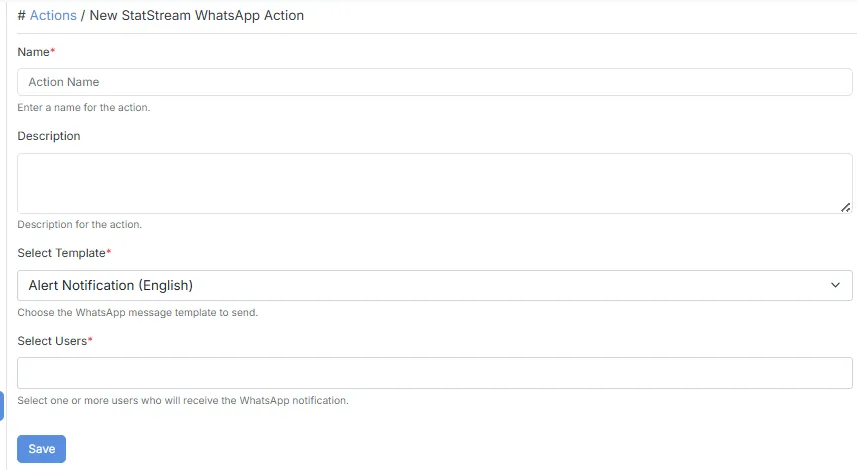
Section titled “StatStream WhatsApp Action”The StatStream WhatsApp Action sends notifications through the StatStream WhatsApp integration using predefined WhatsApp templates. Instead of composing a custom message, you simply select a template and StatStream automatically generates the final WhatsApp notification using live alert information.
Features
Section titled “Features”- Uses predefined StatStream WhatsApp templates.
- Automatically generates the WhatsApp message.
- Includes important alert information such as severity, rule name, monitored variable, and triggered value.
- Sends standardized notifications without requiring message customization.
- Ensures consistent notification formatting across all alerts.
Configuration
Section titled “Configuration”| Field | Description |
|---|---|
| Name | Specifies the action name. |
| Description | Provides a brief description. |
- Uses predefined WhatsApp templates.
- The message content is automatically generated by StatStream.
- The generated notification typically includes:
- Severity icon
- Alert severity
- Rule name
- Variable name
- Triggered value
- Ideal for standardized operational alerts.
Mobile App Notification
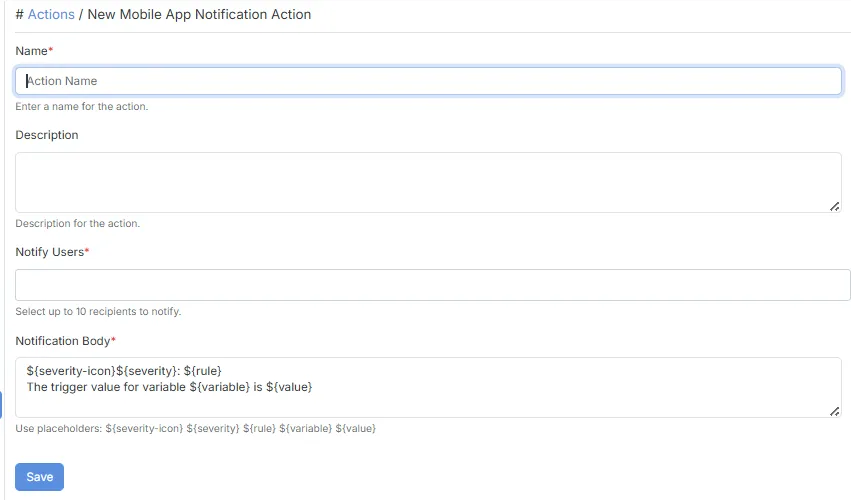
Section titled “Mobile App Notification”The Mobile App Notification action sends push notifications directly to users through the StatStream Mobile Application, ensuring important alerts reach users wherever they are.
Features
Section titled “Features”- Sends push notifications directly to the StatStream Mobile App.
- Supports multiple recipients.
- Supports dynamic placeholders.
- Delivers real-time notifications.
- Ideal for operators, supervisors, and maintenance personnel.
Configuration
Section titled “Configuration”| Field | Description |
|---|---|
| Name | Specifies the action name. |
| Description | Provides a brief description. |
| Notify Users | Select one or more users who will receive the notification. |
| Notification Body | Defines the notification message. Supports dynamic placeholders. |
- Supports up to 10 recipients.
- Supports dynamic placeholders.
- Users must have access to the StatStream Mobile Application.
- Notifications are delivered immediately after the configured trigger occurs.
Typical Use Cases
Section titled “Typical Use Cases”Notification Actions can be used to:
- Notify operators immediately when an alert condition is triggered.
- Inform maintenance teams about equipment faults or abnormal operating conditions.
- Deliver scheduled reminders, reports, or operational updates.
- Send notifications to different communication platforms based on team preferences.
- Keep supervisors and decision-makers informed in real time without requiring them to monitor the dashboard continuously.
Choosing the Right Notification Action
Section titled “Choosing the Right Notification Action”| Notification Action | Best Used For |
|---|---|
| Send Email | Detailed alerts, scheduled reports, and notifications that require customizable subjects and message content. |
| Google Chat | Teams that collaborate using Google Chat and need operational alerts within shared spaces. |
| Telegram StatStreamBot | Instant notifications for maintenance and operations teams using Telegram groups. |
| Slack | Engineering, DevOps, and operations teams using Slack for collaboration. |
| StatStream WhatsApp Action | Standardized WhatsApp notifications using predefined StatStream templates. |
| Mobile App Notification | Sending real-time push notifications directly to StatStream mobile app users. |