
Shifts
Shifts define recurring working time periods such as Morning, Evening, or Night shifts. Each Shift specifies its operating hours, working days, and one or more Shift End Actions that execute automatically when the shift ends.
Shifts help automate shift-based aggregations and reporting by ensuring the selected actions run automatically at the end of each configured shift.
The Shifts List
Section titled “The Shifts List”The Shifts page (Admin → Shifts) displays all configured shifts available in your workspace.
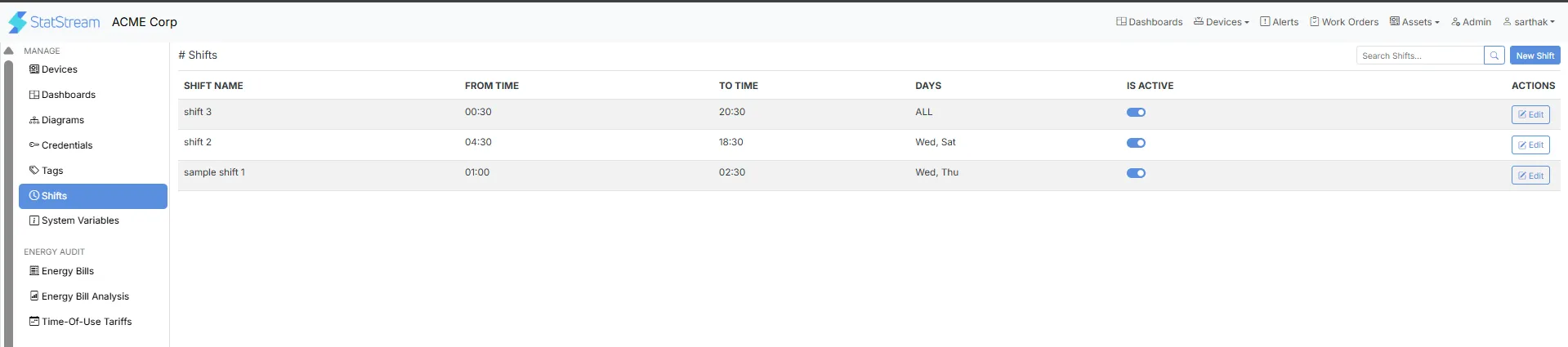
| Column | Description |
|---|---|
| Shift Name | Displays the name of the configured shift. |
| From Time | The start time of the shift. |
| To Time | The end time of the shift. |
| Days | The days on which the shift is active. |
| Is Active | Toggle to enable or disable the shift without deleting it. |
Creating a Shift
Section titled “Creating a Shift”Follow these steps to create a new Shift.
- Click Admin from the top-right navigation bar.
- Select Shifts from the left navigation menu.
- Click New Shift.
Shift Configuration
Section titled “Shift Configuration”Configure the following fields when creating a Shift:
| Field | Description |
|---|---|
| Shift Name | Specifies the name of the shift. |
| Shift Identifier | A unique identifier for the shift. |
| Description | Optional information describing the purpose of the shift. |
| From Time | Specifies the start time of the shift. |
| To Time | Specifies the end time of the shift. |
| Shift Duration | Displays the duration of the shift. This value is calculated automatically based on the selected start and end times. |
| Shift Days | Select the days on which the shift should operate. |
| Shift End Action | Select one or more existing Shift-based Aggregation Actions to execute automatically when the shift ends. |
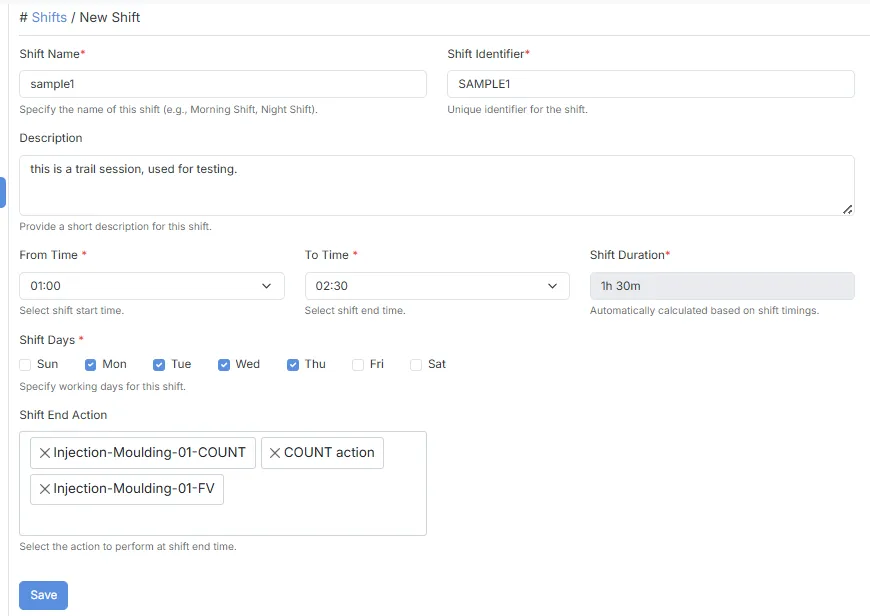
After configuring the required fields, click Save to create the Shift.
- Shift Duration is calculated automatically based on the selected From Time and To Time.
- Multiple Shift End Actions can be associated with a single Shift.
- Only the following Action types are available for selection as Shift End Actions:
- Shift-Combined Aggregation
- Shift-Discrete Aggregation
- Shift-TOU Combined
- Shift-TOU Discrete
- Selected Shift End Actions execute automatically when the configured shift ends.
- Shifts can be enabled or disabled at any time using the Is Active toggle from the Shifts list.
Typical Use Cases
Section titled “Typical Use Cases”Shifts are commonly used to:
- Define production or operational shifts for different teams or work schedules.
- Automatically execute Shift-based Aggregation Actions when a shift ends.
- Generate shift-wise production, energy, or process summaries.
- Support Time-of-Use (TOU) calculations at the end of each shift.
- Organize operational data and reporting based on working shifts.