
Integration Actions
Integration Actions allow StatStream to send data to external systems and services, enabling automated data exchange with other platforms, applications, or IoT infrastructure. Unlike Notification Actions, which are aimed at people, Integration Actions are aimed at other systems.
Integration Actions can be associated with Alert / Action Rules or Schedule Actions, enabling data to be pushed out automatically based on configured conditions or schedules.
Available Integration Actions
Section titled “Available Integration Actions”StatStream supports the following integration methods:
| Integration Action | Description |
|---|---|
| Webhook | Sends a JSON payload to a specified URL via HTTP POST. |
| MQTT Publish | Publishes a message to a specified MQTT topic. |
Each integration action has its own configuration fields, detailed below.
Webhook
Section titled “Webhook”The Webhook action sends a JSON payload to a specified URL using an HTTP POST request. It’s commonly used to push alert data into external systems such as ticketing tools, custom dashboards, or automation platforms.
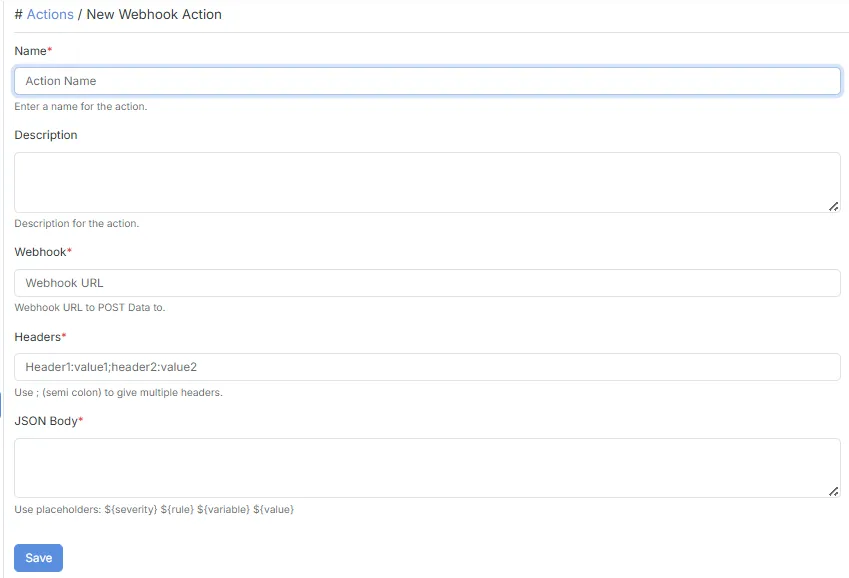
Configuration
Section titled “Configuration”| Field | Description |
|---|---|
| Name | Specifies the name of the action. |
| Description | Provides a brief description of the action. |
| Webhook | The Webhook URL to POST data to. |
| Headers | Custom HTTP headers to send with the request. Use ; (semicolon) to separate multiple headers, e.g. Header1:value1;Header2:value2. |
| JSON Body | The JSON payload to send. Supports placeholders such as ${severity}, ${rule}, ${variable}, and ${value}. |
- Headers and JSON Body are both required fields.
- Multiple headers must be separated using a semicolon (
;). - JSON Body supports dynamic placeholders so payloads contain real-time alert data.
MQTT Publish
Section titled “MQTT Publish”The MQTT Publish action publishes a message to a specified MQTT topic, allowing MQTT-connected systems to subscribe to and process StatStream data.
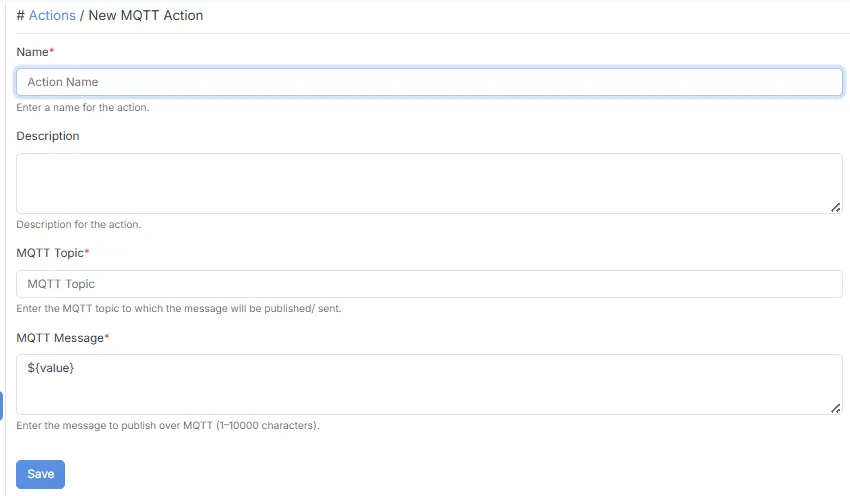
Configuration
Section titled “Configuration”| Field | Description |
|---|---|
| Name | Specifies the name of the action. |
| Description | Provides a brief description of the action. |
| MQTT Topic | The MQTT topic to which the message will be published. |
| MQTT Message | The message to publish over MQTT (1–10,000 characters). Supports placeholders such as ${value}. |
- Message length must be between 1 and 10,000 characters.
- Supports dynamic placeholders so the published message reflects real-time data.
Typical Use Cases
Section titled “Typical Use Cases”Integration Actions can be used to:
- Send alert data into external monitoring, ticketing, or ERP systems.
- Trigger downstream workflows in third-party automation tools.
- Publish real-time data to MQTT-based systems or brokers.
- Feed custom dashboards or analytics pipelines outside StatStream.