
Navigation & Information Widgets
These widgets help users move between dashboards or scan collections of information at a glance — links, maps, lists, and alerts.
Dashboard Link
Section titled “Dashboard Link”Navigate to other dashboards using a link.

Configuration
Section titled “Configuration”| Field | Description |
|---|---|
| Dashboard | Choose which dashboard to navigate to. |
- Clicking the widget takes the viewer directly to the selected dashboard.
- Useful for linking a summary dashboard to more detailed, site- or equipment-specific dashboards.
Sites Map Widget
Section titled “Sites Map Widget”Show configured sites on a geographic map.
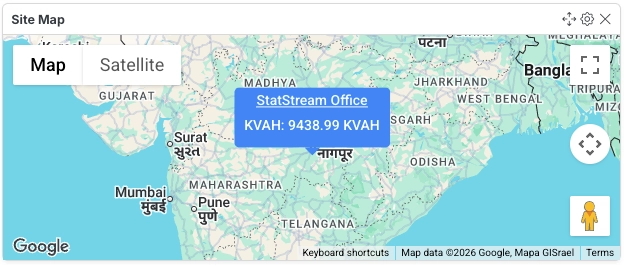
Configuration
Section titled “Configuration”| Field | Description |
|---|---|
| Active Sites | Select active sites. |
| Map Zoom | Select appropriate zoom of the map. |
| Map Height | Select appropriate height of the map. |
| Font Size | Select appropriate font size for the marker. |
- Displays each selected site as a marker on the map, using its configured location.
- Map Height and Font Size control how the widget renders on the dashboard grid, useful for tuning readability at different widget sizes.
List Widget
Section titled “List Widget”A list widget is used to display a series of items or data points in a vertical list.
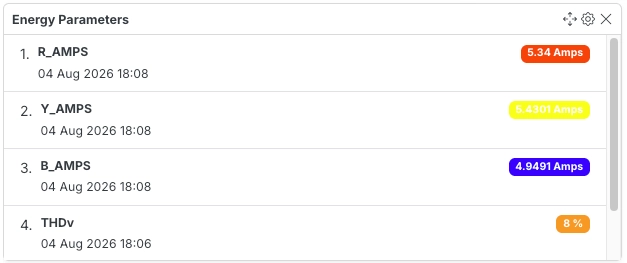
Configuration
Section titled “Configuration”| Field | Description |
|---|---|
| Variable IDs | Select up to 15 variables to display in the list. |
| List Height | Adjust the vertical size of the list. Higher values show more items at once. |
- Supports up to 15 variables in a single list.
- Useful for compactly monitoring several related values — like a punch list of readings — without needing a separate widget for each.
Alert List Widget
Section titled “Alert List Widget”The Alert List Widget displays a list of recent active 15 alerts.
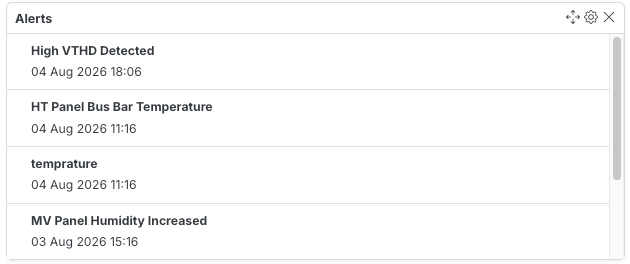
Configuration
Section titled “Configuration”No additional fields — just Horizontal Size and Title.
- Automatically shows the 15 most recent active alerts; no manual selection needed.
- Useful as a quick at-a-glance status panel alongside live data widgets.