
Derived Variables
A Derived Variable computes its value from one or more other variables using a formula, rather than coming directly from a device. Useful for calculations like power factor, efficiency ratios, or converted units that combine multiple raw readings.
Creating a Derived Variable
Section titled “Creating a Derived Variable”- From the top bar, click Admin.
- Click Devices.
- Select the specific device.
- Click New Variable.
- Choose Derived.
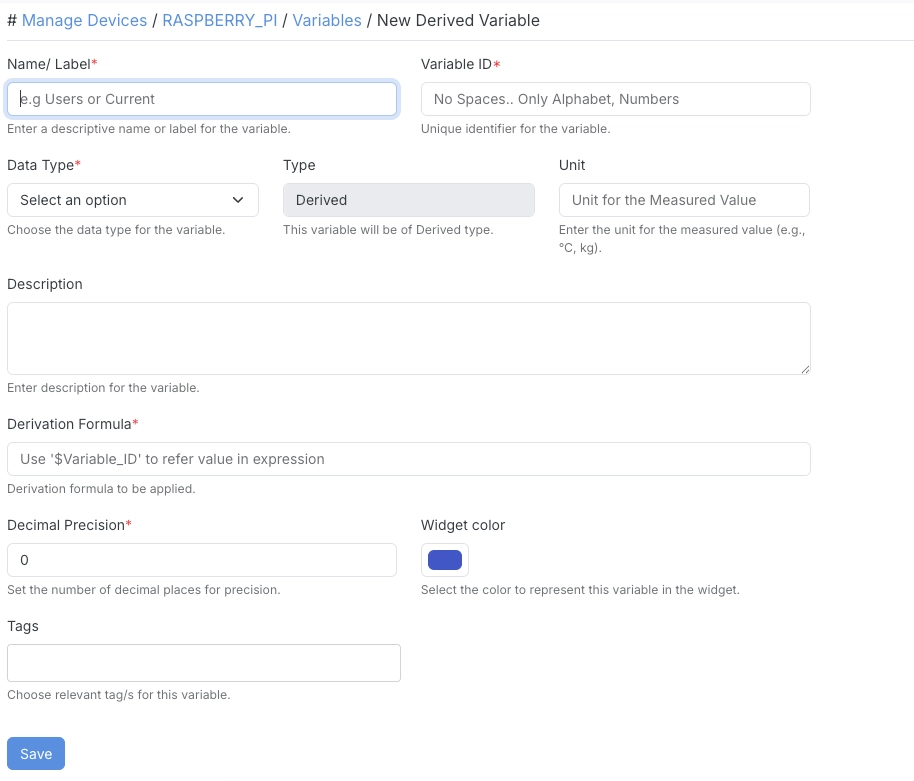
Then fill in:
| Field | Description |
|---|---|
| Name/Label | A descriptive name or label for the variable. |
| Variable ID | A unique identifier for the variable. No spaces — letters and numbers only. |
| Data Type | The data type for the variable — Float/Number, Text, Boolean, or Increment Number. |
| Derivation Formula | The expression used to compute this variable’s value from other variables. |
| Unit | The unit for the computed value (e.g. °C, kg). |
| Description | A description for the variable. |
| Decimal Precision | The number of decimal places to round the computed value to. |
| Widget Color | The color used to represent this variable in dashboard widgets. |
| Tags | Relevant tags for this variable. |
Examples
Section titled “Examples”| Derived Variable | Formula | What it computes |
|---|---|---|
| Average Voltage | ($R_VOLT + $Y_VOLT + $B_VOLT) / 3 | The mean of the three phase voltages, useful when you want one number instead of three separate gauges. |
| Total Current | $R_CUR + $Y_CUR + $B_CUR | Combined current draw across all three phases. |
| Energy Cost (Today) | $kwh * 8.5 | Converts raw energy consumption into cost using a fixed per-unit rate. |
- Derived Variables recalculate automatically whenever the variables referenced in their formula update.