
Create New Asset
The Assets feature allows you to register and manage physical equipment within StatStream. Assets represent the devices, machinery, or infrastructure that you want to monitor, maintain, and organize throughout their lifecycle.
Typical examples include:
- Industrial machines
- Pumps and motors
- Transformers
- HVAC systems
- Generators
- Production equipment
By creating assets, you can organize equipment, maintain accurate records, and simplify monitoring across your facilities.
Create a New Asset
Section titled “Create a New Asset”Follow these steps to create a new asset:
- Navigate to Assets from the top navigation bar.
- Select Assets and click New Asset.
- Enter the required asset details:
- Asset Owner (e.g., John Doe)
- Asset Type (e.g., Equipment)
- Asset Status (e.g., Active)
- Criticality (e.g., High)
- Asset Location (e.g., Production Floor)
- Optionally provide additional information:
- Asset Tag (e.g., AST-001)
- Invoice Date
- Tags (e.g., Electrical, HVAC)
- Manufacturer (e.g., Siemens)
- Model (e.g., 3RT2026)
- Serial Number (e.g., SN-123456789)
- Manufacturing Date
- Commissioning Date
- Decommissioning / End of Life Date
- Review the information and click Save to create the asset.
Asset Creation
Section titled “Asset Creation”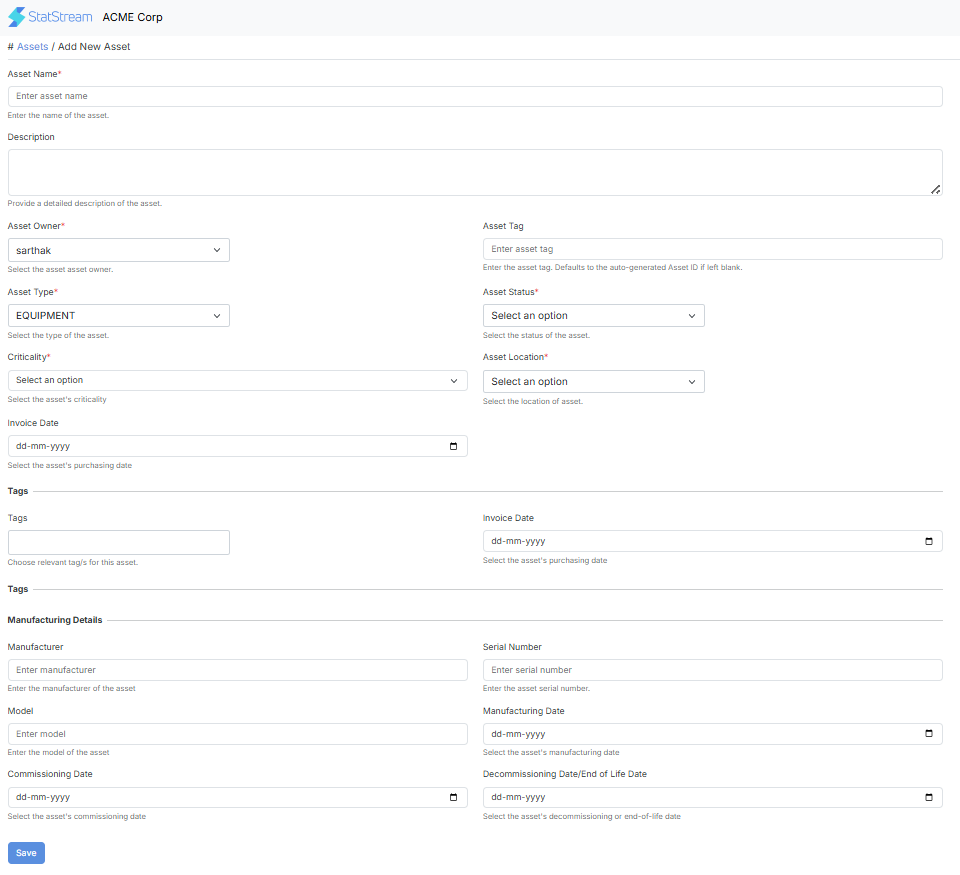
Best Practices
Section titled “Best Practices”To keep your assets organized and easy to manage:
- Use clear and descriptive asset names.
- Select the correct asset type and status.
- Assign the appropriate criticality level based on business impact.
- Follow a consistent naming convention across all assets.
- Keep asset information up to date whenever changes occur.