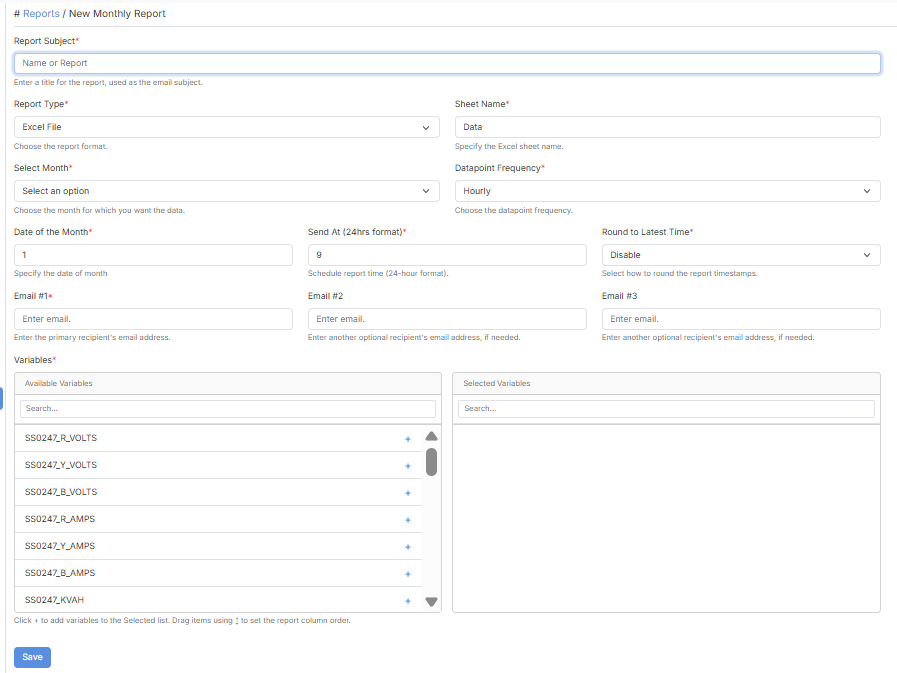
Configure a monthly email report for your selected variable data.
| Field | Description |
|---|
| Report Subject | A title for the report, used as the email subject. |
| Report Type | The report format (e.g. Excel File). |
| Sheet Name | The Excel sheet where data is stored. |
| Select Month | The month to pull data for — current or previous month. |
| Datapoint Frequency | How data points are sampled within the month — see below. |
| Date of the Month | The day of the month the report is generated. |
| Send At (24hrs format) | The time on that day the report is sent. |
| Round to Latest Time | Disable = use real/original timestamps. Second or Minute = round timestamps to that level. |
| Email #1 | The primary recipient’s email address. Required. |
| Email #2 / Email #3 | Optional additional recipients. |
| Variables | The variables to include in the report. |
| Option | Description |
|---|
| Hourly | Takes the first and last datapoint of each hour. |
| Daily | Takes the first and last datapoint of each day. |
| Monthly | Takes the first and last datapoint of the entire month. |
