Skip to content
Docs

Periodic Variables

A Periodic Variable automatically calculates data from a Source Variable at fixed time intervals and stores the result as a new variable — for example, summing energy consumption every 20 minutes, or averaging temperature hourly.

  1. From the top bar, click Admin.
  2. Click Devices.
  3. Select the specific device.
  4. Click New Variable.
  5. Choose Periodic.
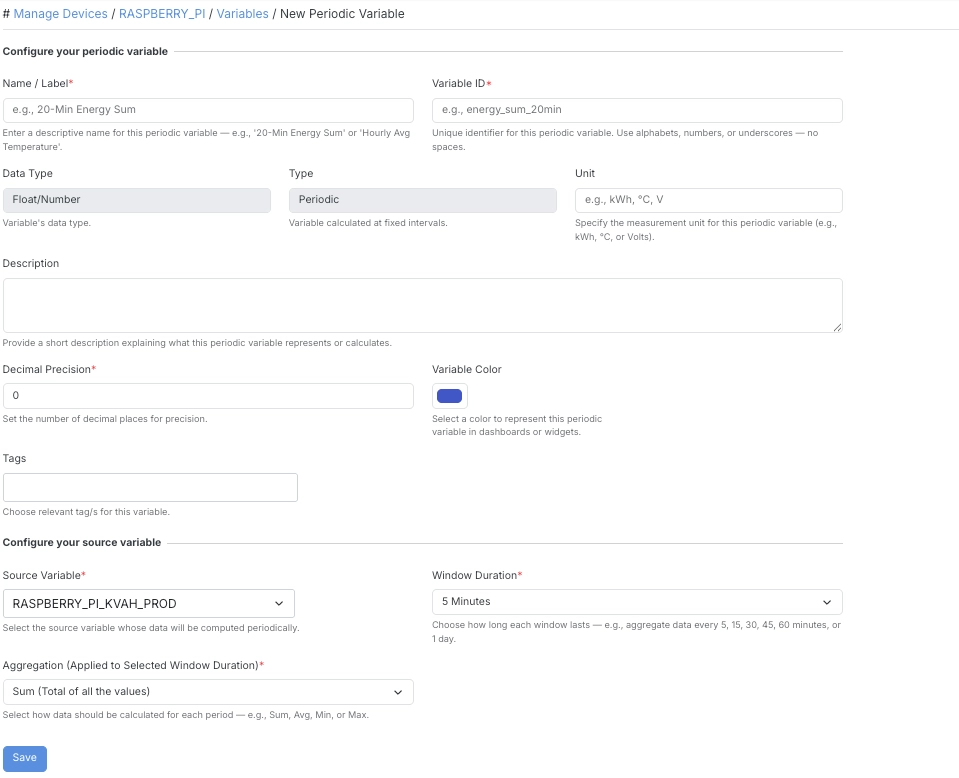
New Periodic Variable
FieldDescription
Name/LabelA descriptive name for this periodic variable (e.g. 20-Min Energy Sum or Hourly Avg Temperature).
Variable IDA unique identifier for this periodic variable. Letters, numbers, or underscores — no spaces.
Data TypeThe variable’s data type.
UnitThe measurement unit for this periodic variable (e.g. kWh, °C, V).
DescriptionA short description explaining what this periodic variable represents or calculates.
Decimal PrecisionThe number of decimal places for precision.
Variable ColorThe color used to represent this periodic variable in dashboards or widgets.
TagsRelevant tags for this variable.
FieldDescription
Source VariableThe variable whose data will be computed periodically.
Window DurationHow long each window lasts — 5, 15, 30, 45, or 60 minutes, or 1 day.
AggregationHow data should be calculated for each period — Sum, Average, Min, Max, Count, Difference, or Range.
  • Window Duration sets how often the calculation runs — e.g. every 5 minutes, the Periodic Variable recalculates using the most recent window of Source Variable data.
  • Aggregation determines how the values within each window are combined:
    • Sum — total of all the values.
    • Average — mean of all the values.
    • Min / Max — smallest or largest value in the window.
    • Count — number of data points in the window.
    • Difference — change between the first and last value in the window.
    • Range — difference between the max and min value in the window.